Updated November 2026
When I originally built my Find Your Path quiz, I wasn't trying to grow my email list. I just wanted to help people land on the right service with ease, because if you're not a designer, it can be confusing. Do you need branding? A website? Both? Seriously, what do you even need? I wanted to point people in the right direction, and show them that I understand the pain points they’re going through. That said, a few months after building the quiz, I realized it could be a lead magnet too, so I built Flodesk workflows with an email sequence for every quiz result.
But then I finally looked at my analytics. Almost nobody was getting into those workflows. Turns out I was giving away the whole enchilada: people got their full result before I ever asked for their email. Why would anyone sign up for something they already had? On top of that, a flowchart freebie I'd made for my website pop-up was quietly pulling sign-ups away from the quiz. This made me realize I had to rethink my quiz so it could better serve me.
Today, the quiz is my website pop-up, people get their full result by email, and one Flodesk workflow follows up with every quiz taker based on their result. In this post, I'm walking you through how I reworked my quiz setup so it sends automated follow-up emails to potential clients, gently guiding each one toward the right next step, whether that's a template they can start using today or a discovery call with me so I can support them. Here's exactly how my new quiz workflow works, what I changed, and how I'd set it up for a client if they wanted a workflow like this too.
Quick note: I'm a proud Flodesk Partner, so some links in this post are partner links. If you sign up through my partner link, I may earn a commission at no extra cost to you. I only share tools I actually use in my own business, and Flodesk is where every one of my emails lives.
So, what is a Flodesk workflow?
A workflow is Flodesk's email automation: a series of emails and steps that run on their own after someone takes an action, like signing up through a form. It's how I follow up with every lead without doing it manually.
Every workflow is built from a few simple pieces:
Trigger: what starts the workflow. Mine starts when someone is added to one of my quiz segments (more on how I set that up below).
Emails: the messages Flodesk sends for you, in order.
Time delays: how long to wait between emails, like one day or one week.
Branches: optional forks in the road that send different people down different paths, based on things like which segment they're in or whether they clicked a link in an email.
The cool thing about workflows is you set them up once, and they run in the background every time someone new comes into your world. (You can even have more than one running at once!) In my business, the quiz sorts people, the Flodesk workflow does the follow-up, and my CRM takes over the moment someone books a call.
Pairing a workflow with a quiz is where it gets really fun. A freebie tells you someone is interested. A quiz tells you what they're interested in, so every email can meet them right where they are.
What happens when someone takes my Find Your Path quiz?
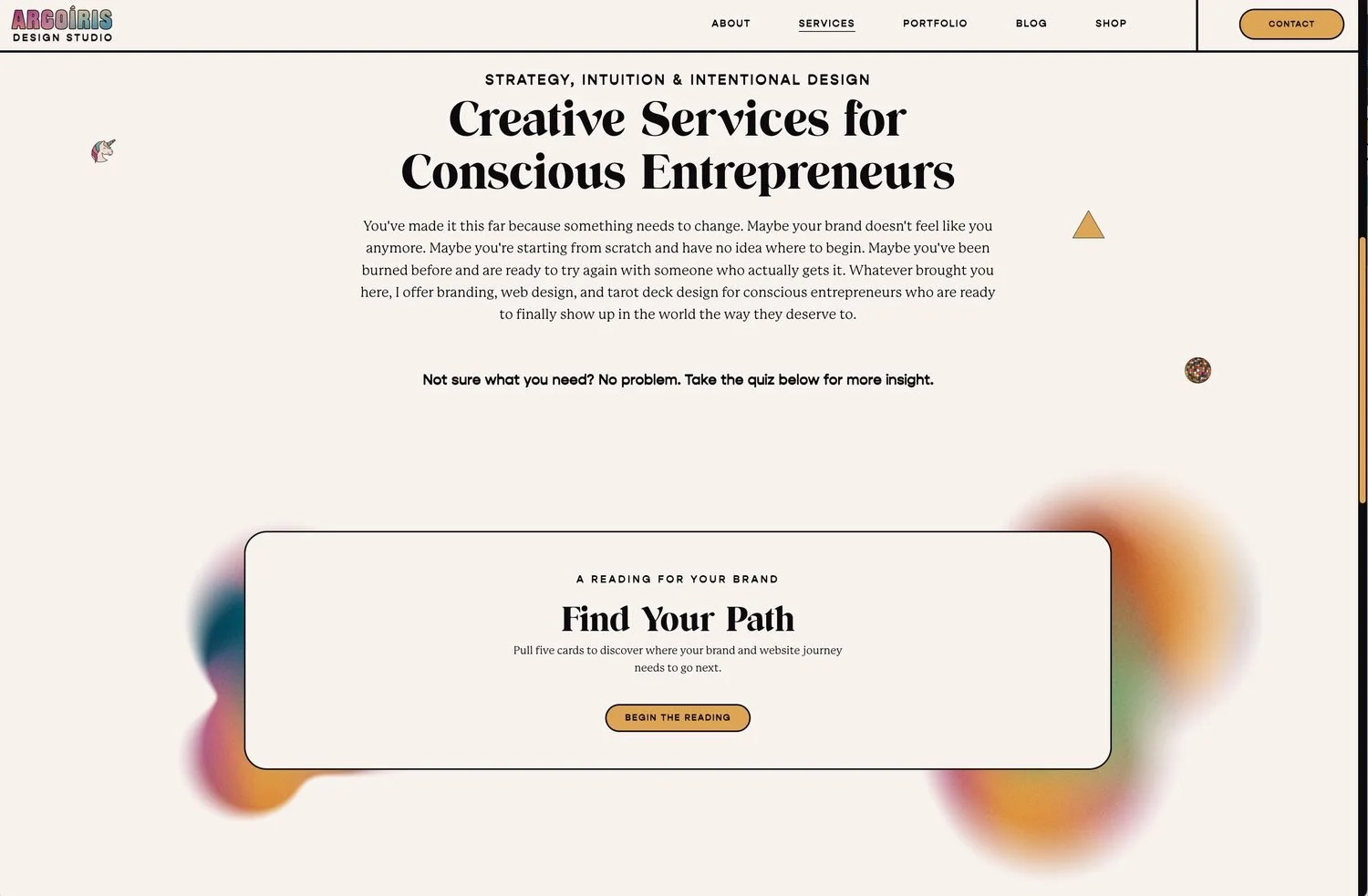
My Find Your Path quiz asks five quick questions, then sorts each person into one of four paths: Branding, Web, Both, or Not Sure. Each path matches a different kind of support I offer, from Astrobranding Readings to Squarespace templates to fully custom brand and website projects.
Here's the flow from their side:
They see the pop-up on my website, click the button, and land on the quiz.
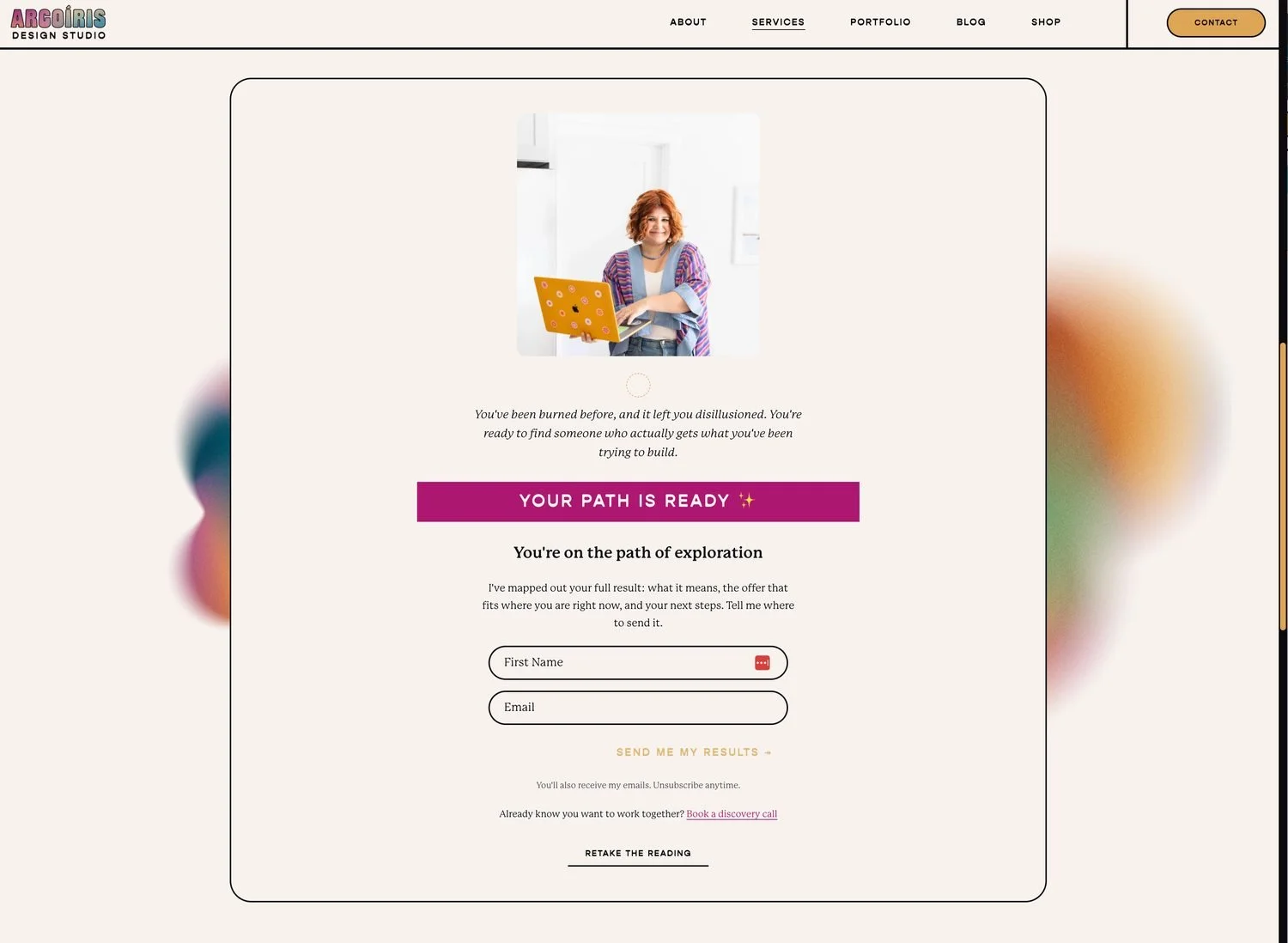
They take the quiz and get a sneak peek of their result: their path name and a short "your path is ready" teaser.
They enter their email in a Flodesk form to get the full result sent to their inbox.
Flodesk adds them to a segment that matches their path. Each path has its own form, and each form drops people into its own segment: Quiz: Branding, Quiz: Web, Quiz: Both, or Quiz: Not Sure.
Joining that segment triggers the workflow, and their full result lands in their inbox within minutes.
And this is where the magic of workflows really shines. Segments let me get granular about how I show up for each person, based on what they told me in the quiz. Instead of one-size-fits-all emails, every quiz taker hears about the thing they actually need, without me lifting a finger.
How did I turn four segments into one email automation workflow?
I used one trigger that listens for all four segments, then a branch that splits people back out by segment. The segments stopped being a reason for separate workflows and became the fork in the road instead.
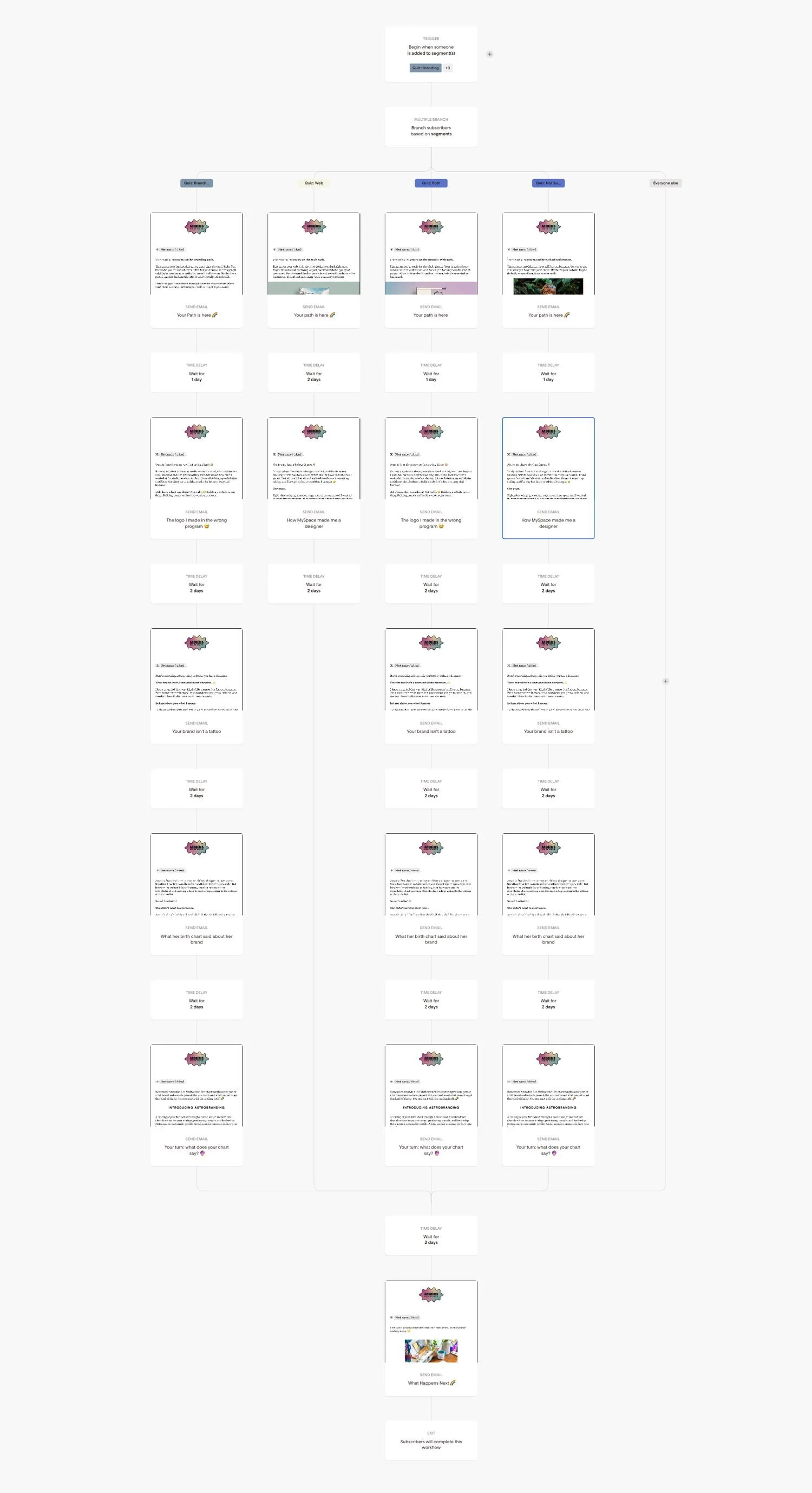
But it didn't start that way. At first, I built four separate workflows for my quiz, one for each segment result. I honestly didn't know I could combine them in one workflow, since people were landing in four different places. This meant I had four different workflows I had to update, four different sets of stats for the same automation flow, and four chances for something to quietly break without me noticing.
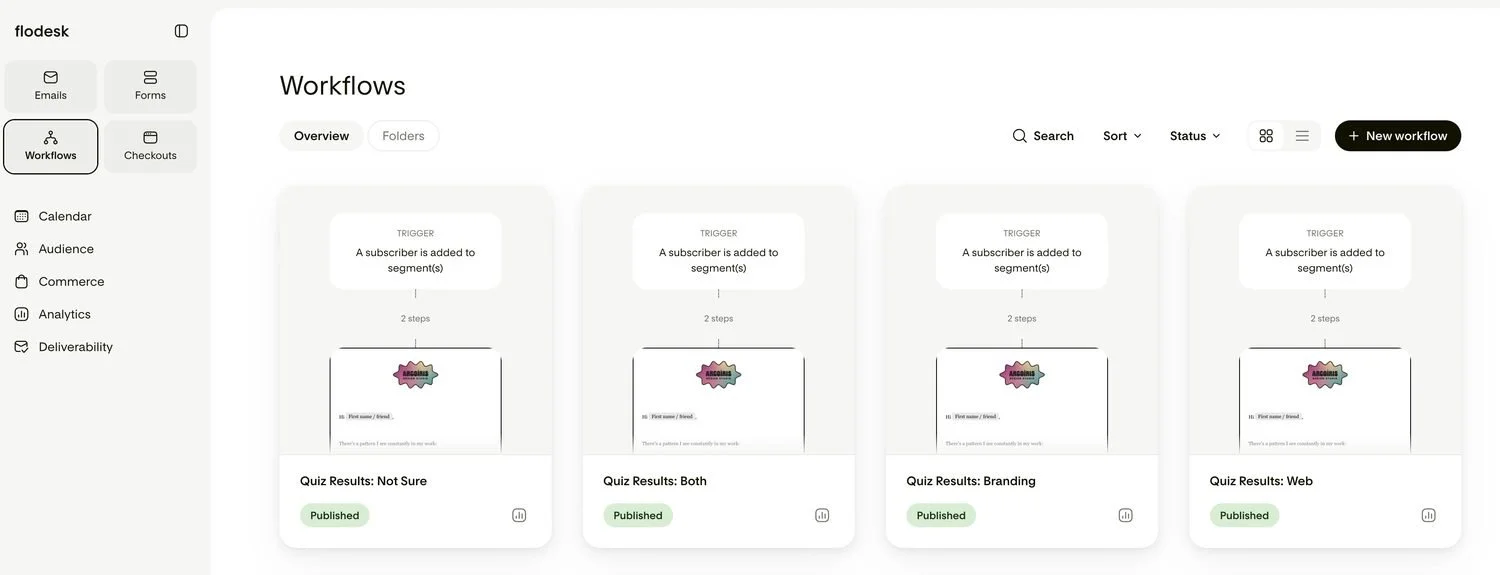
Here's how I rebuilt a much more efficient Flodesk workflow:
Trigger: "Begin when someone is added to segment(s)." I selected all four quiz segments in one trigger. Anyone who joins any of them starts the same workflow.
Multiple Branch: "Branch subscribers based on segments." This step looks at which segment each person is in and sends them down the matching path: Branding, Web, Both, or Not Sure. (There's also an "Everyone else" path as a safety net, in case someone sneaks in without a quiz segment.)
Each path sends its own first email, then waits one day before the next one.
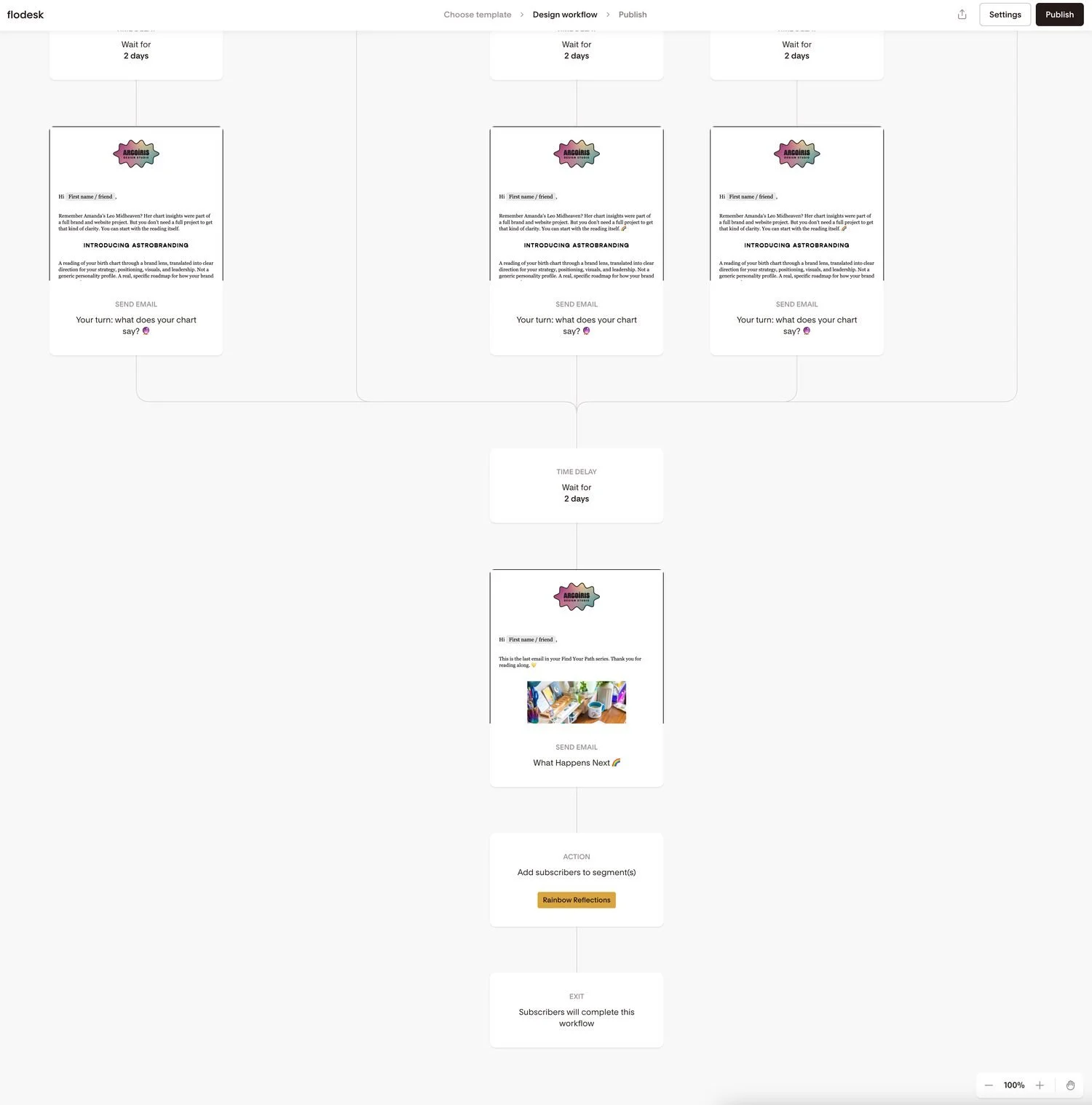
All four paths rejoin after five emails, all sent automatically. Everyone gets one final wrap-up email, then flows into my weekly Rainbow Reflections newsletter. (More on that last email below.)
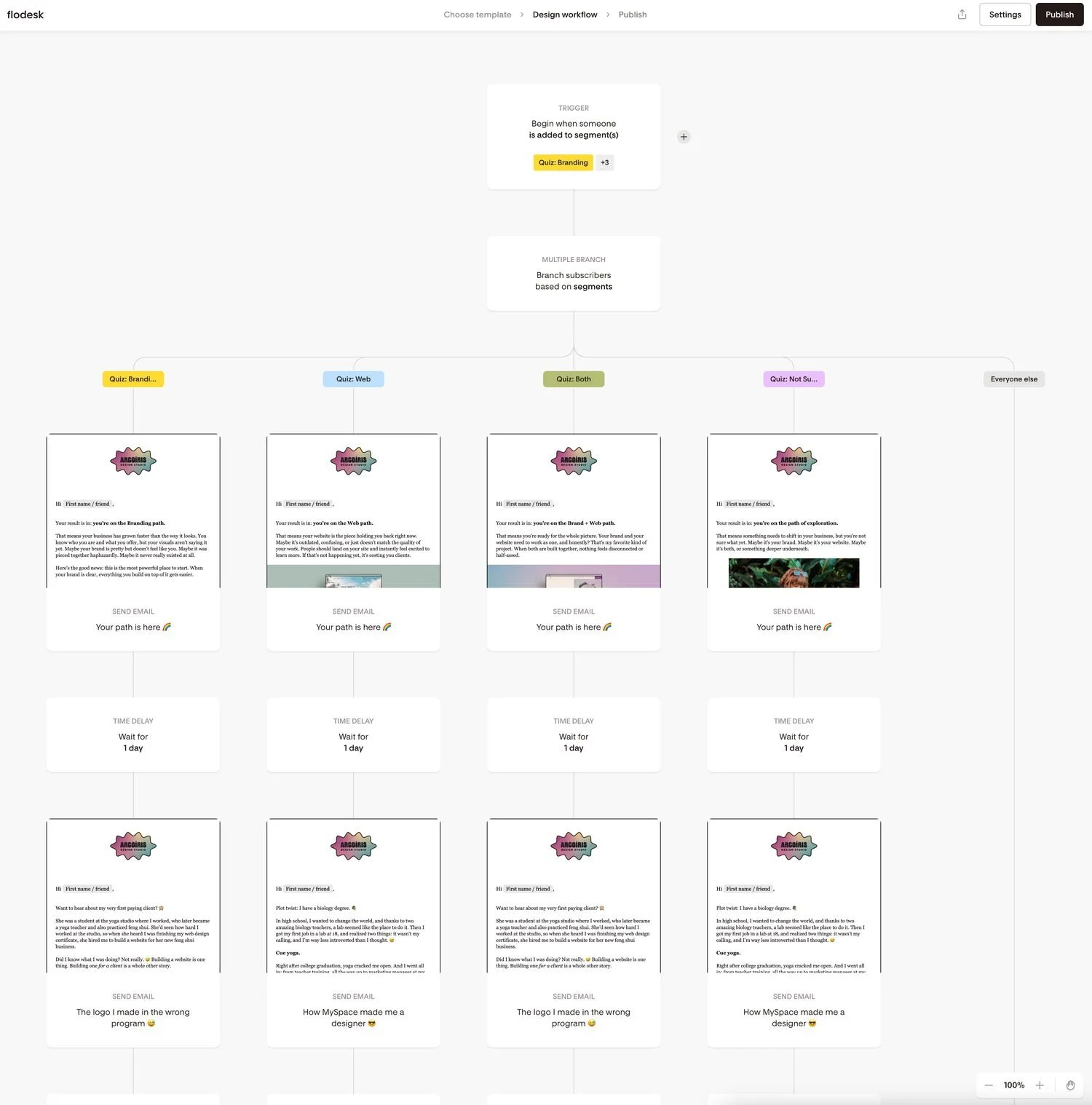
One workflow means one place to update, one place to check stats, and way less chance of something not working without me noticing. Future me is very grateful.
What does each path send, and when?
Every path gets five emails plus a wrap-up, starting with a personalized result the moment they sign up. The first email is unique to each path. After that, some of the stories overlap, because the lessons behind them apply to multiple segments.
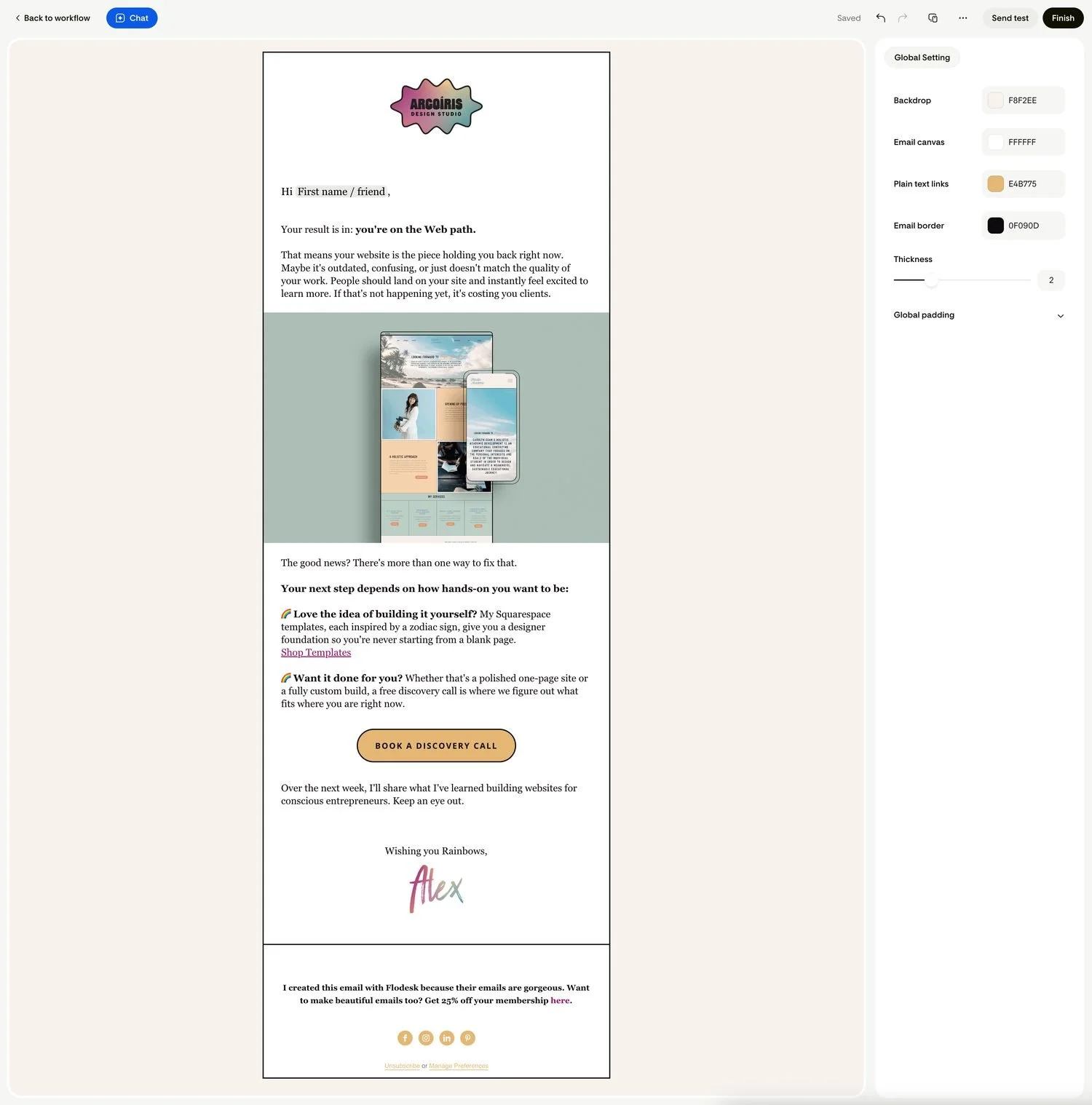
Email 1: "Your path is here 🌈" (sends right away, different for each path)
This is the full result they asked for, plus their next step. Each path gets a different offer:
Branding: your business has grown faster than the way it looks. Next step: an Astrobranding Reading, or book a discovery call.
Web: your website is the piece holding you back. Next step: shop my Squarespace templates, or book a discovery call for a custom site.
Both: you're ready for the whole picture. Next step: an Astrobranding Reading or a discovery call.
Not Sure: something needs to shift, and that's okay. Next step: a free, no-pressure discovery call.
Email 2 (one day later): an origin story. Branding and Both get "The logo I made in the wrong program," about my very first client and why brand always comes before website. Web and Not Sure get "How MySpace made me a designer," the story of how I found my way into design.
Emails 3 to 5 (each sent two days after the one before): shared stories that build trust.
"Your brand isn't a tattoo": why your brand and website are allowed to grow with you
"What her birth chart said about her brand": a real client story
"Your turn: what does your chart say?": an invitation to explore your own
The wrap-up email follows two days after Email 5, so from quiz to newsletter, the whole sequence runs over about nine days.
Where does everyone go after the quiz emails end?
Everyone lands in my weekly Rainbow Reflections newsletter, but not before one last email that tells them exactly that.
That email is called "What happens next ✨," and it exists because of a value I build my whole business on: clear is kind. To me, ethical marketing means no one should be blindsided by what shows up in their inbox. So instead of quietly sliding quiz takers into my newsletter, I tell them what's coming: one email every Thursday, with behind-the-scenes stories and practical ideas for their business. No surprises, no "wait, when did I sign up for this?" It gives them the agency to decide for themselves if they want to stick around, which has two lasting effects:
I end up with a list of more engaged people who are actually interested in receiving my emails.
It builds trust with potential clients or customers.
This is a win-win scenario for me as a designer with a long sales journey. Getting people to work with me is all about building trust, so if I can do that through an automated workflow, why wouldn’t I?
This email also invites them to hit reply and tell me what they'd love me to write about, so the newsletter starts as a conversation, not a broadcast. It's one more layer of trust, built automatically. And their replies tell me exactly what my audience wants to read next.
Do you need a paid plan to build workflows like this?
Yes, but the good news is that workflows are included in both of Flodesk's paid plans. Flodesk is one flat price with unlimited subscribers and unlimited emails, so growing your list never grows your bill. Unlimited Email is $46/month and Unlimited Everything is $99/month, and both include unlimited forms and unlimited workflows. (With an annual subscription, they work out to $38/month and $79/month.)
For me, the best part is room to grow: a quiz is designed to bring new people in every week, and I never want to hesitate about sharing it more widely because my list is getting bigger. If that kind of room to grow sounds good for your business too, you can try Flodesk here.
How would I set this up for a client?
I'd start with the front door, keep everything in one workflow, and test it like a stranger would before it ever goes live. When I build a quiz funnel or any automated workflow for a client, here's the process I follow:
Map the paths first. Before we touch Flodesk, we decide what each result means and what the right next step is for that person, whether that's a product, a service, or a call.
Check the front door. If people can get everything without sharing their email, no workflow can save it. We make sure there's a real reason to sign up.
Let segments be the fork, not the reason for more workflows. One form and one segment per path, then one trigger and one branch to sort everyone. That makes it so much easier for my client to manage later.
Make Email 1 the gift they asked for. Deliver the result first, then offer the next step. The pitch lands better when it follows real value.
Tell people what comes next. Every workflow ends with a clear wrap-up email, so subscribers always know where they're headed.
Test every path with a fresh email. I use Gmail plus-addresses (like yourname+web@gmail.com) so each test looks like a brand new subscriber, and I make sure every path lands in the right segment.
Start simple, then upgrade. Version one just needs to work. Engagement-based branches and other bells and whistles can come later, once there's real data to learn from.
Want to see it in action? Take the Find Your Path quiz and watch your own result land in your inbox. If you'd love a workflow like this built for your business, book a discovery call with me. And if you're ready to build your own, you can start with Flodesk here.
Frequently Asked Questions
-
Yes. Add all your segments to a single "added to segment(s)" trigger, then use a Multiple Branch to send each segment down its own path.
-
There's no magic number, but I send five emails plus a wrap-up over about nine days. That's enough time to deliver the result, share a few stories, and invite a next step without overwhelming anyone.
-
Yes. I give each quiz result its own Flodesk form, and each form adds people to a matching segment. That segment is what triggers the workflow.
-
Join Rainbow Reflections below and hit reply on any email. I read every one. 💛
Let’s Stay Connected
Explore My Services to learn more about branding and web design support.
Explore My Shop for accessible brand tools and resources.
Subscribe to my Substack for ongoing deep dives on design, astrology, entrepreneurship and being a human in the modern world.